


AutoSmart Parts
Wireless CarPlay Adapter with Baby Car Camera, 1080P Night Vision Cabin Monitor
Keep your eyes on the road and still know what is happening in the back seat. This Ottocast adapter adds wireless CarPlay and a 1080P wide angle night vision baby camera in one setup.
Regular price
$49.99 AUD
Regular price
$64.99 AUD
Sale price
$49.99 AUD
 Secure shipping
 Easy exchange
 24/7 support
 Wireless CarPlay plus live 1080P baby camera in one device
150 degree wide angle with crystal clear night vision
Split screen and picture in picture views
Privacy safe: real time stream only, no recording or upload
Quantity
Couldn't load pickup availability
Specifications
Specifications
Compatible With
Compatible With
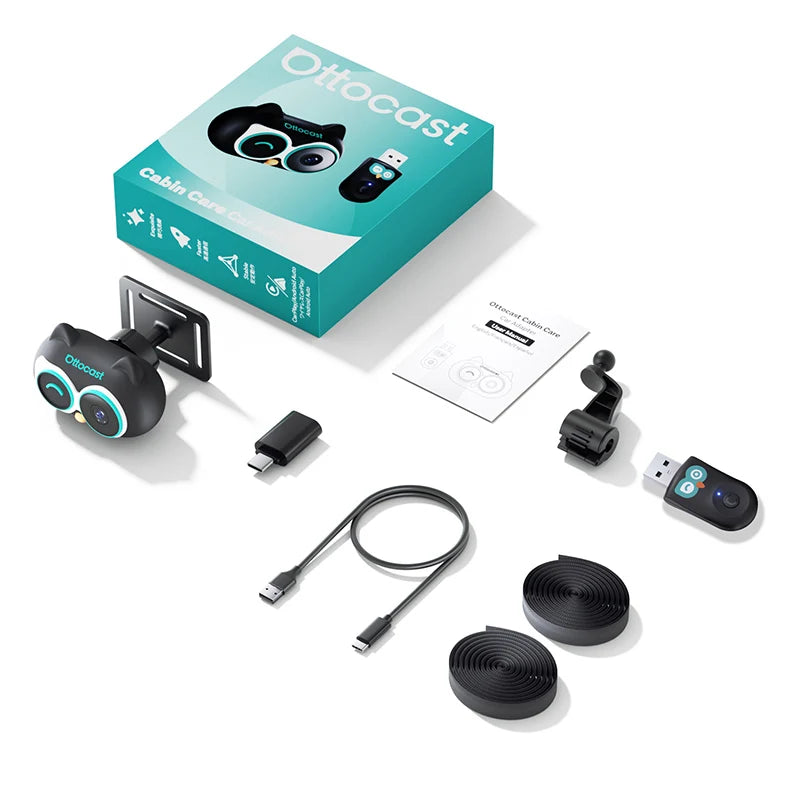
What’s Included / Care Instructions
What’s Included / Care Instructions


Quick Setup
1. Plug In the Adapter
Plug the Ottocast adapter into your car's USB port (the one that supports wired CarPlay). Wait for the adapter to power up.
2. Pair Your iPhone
Connect via Bluetooth in your iPhone settings. CarPlay launches automatically on your car's screen.
3. Install the Baby Camera
Cabin Care variant only. Strap or clip the camera onto the back seat headrest, point at your baby, and the live view appears on your car's screen.
Common Questions Before You Buy
Will it work in my car?
Only if your car came with factory wired CarPlay (USB cable based). NOT compatible with BMW or Tesla even if they have CarPlay.
Will it work with my Android phone?
No. This is iPhone CarPlay only. Not compatible with Android Auto. Also NOT compatible with Huawei, Honor, or Xiaomi Redmi phones.
Does the camera record or upload to cloud?
No. The camera is real time live stream only. Nothing is recorded, saved, or uploaded. Privacy is fully protected.
Can I see the camera and navigation at the same time?
Yes. Split screen and picture in picture views let you watch the back seat camera while CarPlay navigation runs.
What's the difference between the two variants?
Cabin Care includes both the wireless CarPlay adapter and the 1080P baby camera. Mini Adapter is just the wireless CarPlay box, no camera.